
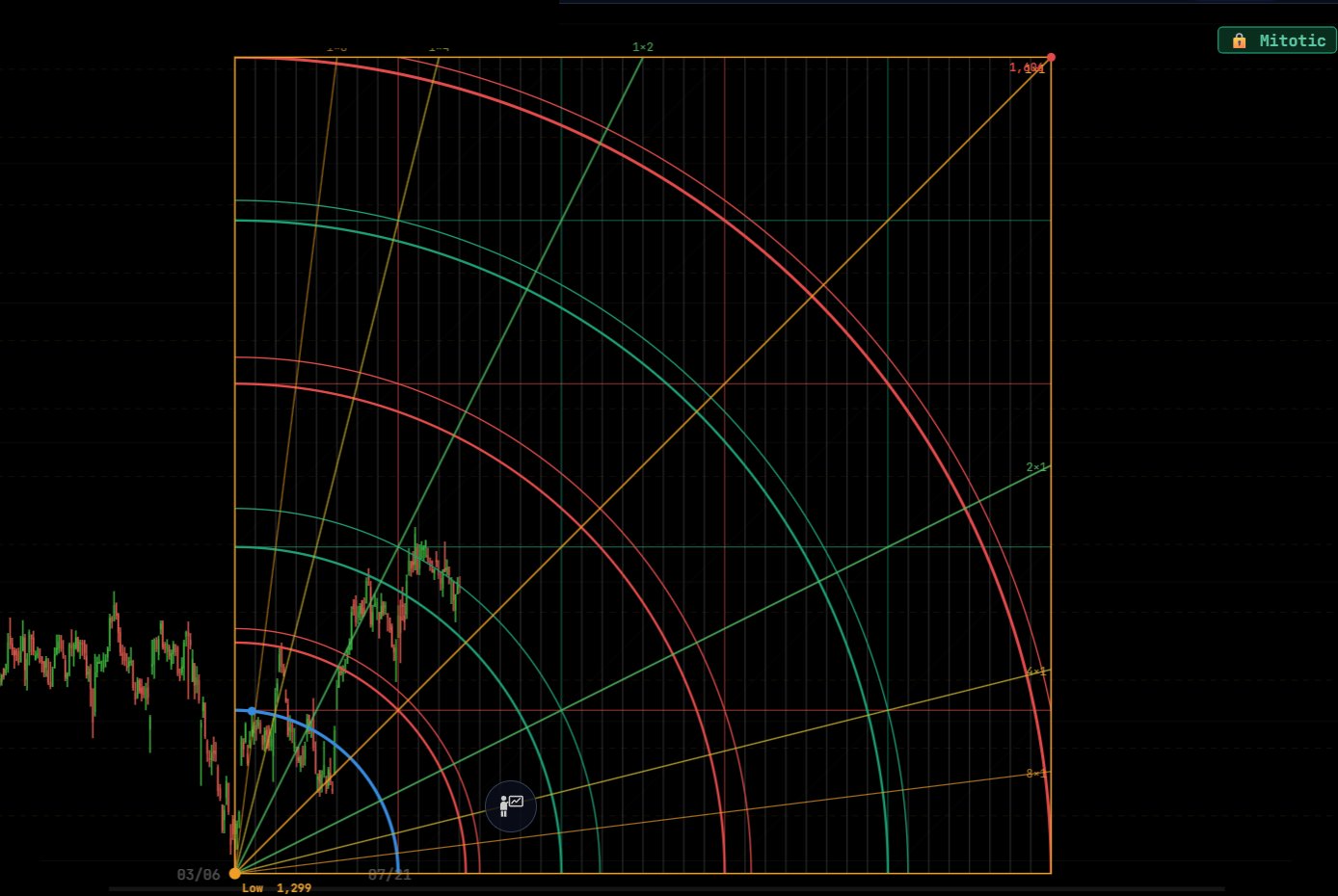
What a Gann Box is
W. D. Gann held that price and time are two views of the same move. A Gann Box, also called a Gann Square, makes that visible: it builds a square from a swing so that one side measures price and the other measures time, then repeats it as a grid.
Inside the square sit three kinds of lines. The 1×1 diagonal is the balance of price and time. The angle fan (8×1, 4×1, 2×1, 1×2, 1×4, 1×8) shows steeper and shallower rates of travel. The arcs, swung from the anchor, mark distances that combine price and time at once.
How to read it
Price above the 1×1 line is moving faster than time and is strong; price below it is weak for the time that has passed.
Arcs work as decision levels. On the CHOLAFIN box above, price reached the 2nd arc: a close above it opens the way to the 3rd arc, while a bar rejecting there is the counter-trend signal. The further arcs and the top of the square are the larger levels ahead.
The vertical boundaries of each square are time levels. They mark dates to watch for a turn, independent of where price is.
Placed from the right swing, automatically
The value of a Gann Box depends on its anchor. Gann ▲ detects the important low, anchors the box there and fixes the blue arc to the next swing high. Gann ▼ does the same downward from an important high to the next swing low.
You can also place it yourself from the Overlays panel as Gann Sq Up or Gann Sq Dn, in a 5×5 or an 8×8 grid.
As with every angle in Geometriya, the box is drawn on Mitotic Scaling, so the square stays square and the 1×1 stays at 45° however you zoom.
Settings
Right-click either Gann button to open the box settings.
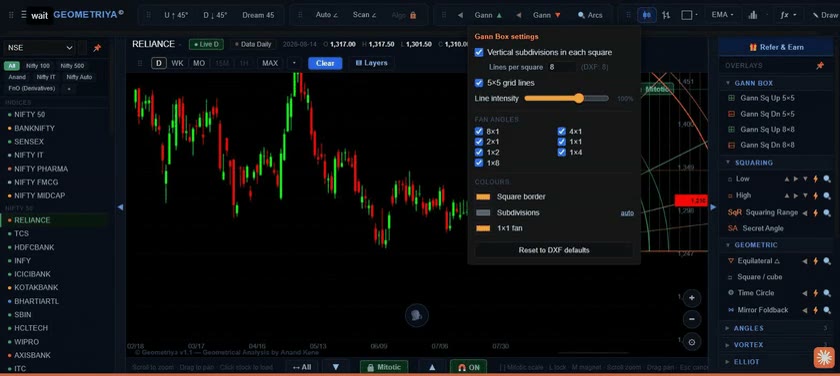
- Vertical subdivisions
- Time lines inside each square, with the number of lines per square.
- 5×5 grid lines
- Show or hide the grid inside the box.
- Line intensity
- How strongly the construction lines draw over the candles.
- Fan angles
- Turn each of 8×1, 4×1, 2×1, 1×1, 1×2, 1×4 and 1×8 on or off.
- Colours
- Square border, subdivisions and the 1×1 fan.
Questions
Is a Gann Box the same as the Gann Square of 9?
No. The Square of 9 is a numeric spiral used to calculate price levels from a number. A Gann Box is a construction drawn on the chart from a swing, combining price, time, angles and arcs. Geometriya draws Gann Boxes; it does not currently include a Square of 9 calculator.
Should I use 5×5 or 8×8?
Both use the same square. The 8×8 extends the grid further in price and time, which suits long swings and weekly or monthly charts; the 5×5 keeps a daily chart uncluttered.
Can I draw a box from a high?
Yes. Gann ▼, or Gann Sq Dn in the Overlays panel, anchors the box at an important high and projects it downward.
Can I scan for stocks at their Gann arcs?
Yes. Gann arcs are among the scanners in Geometriya, alongside Dream-45, Squaring of Range and triangles.
Does it place trades?
No. Geometriya is an analysis and paper-trading tool; you can practise with simulated trades, but no real orders are placed.